
Migrate Existing Repositories to a Capability
Learn how to migrate existing repositories to a capability
All repositories must be migrated by February 27th, 2025.
Before you start
Make sure you have the following:
- Understand the Basics: Read and understand the Basic Concepts and Rules.
- Learn Available Properties: Review all the properties available for use in the capability
_defaults.ymland repository configuration files. - Repository Access: Ensure you have access to the
org-configrepository. - YAML Knowledge: Have a basic knowledge of YAML syntax. You can learn more by reading this article.
Check if you own repositories to migrate
We recommend each user to check if there are any repositories they own that need to be migrated to CBG. To do so:
- Navigate to developers.flutter.com
- Click on the search field on the top right of the page
- Search your GitHub username
- Press the
Repositoriestab on the left panel - All repositories without a capability are not being managed by CBG and have to be migrated.
Here’s that page for my user as an example.
Migrating Existing Repositories to a Capability
Migrating your existing repositories to be managed by the Codebase Governor (CBG) is a straightforward automated process. Before you begin, ensure you understand the key points about creating new capabilities, defining owners and maintainers, and using the _defaults.yml file to standardize settings:
If you're migrating your repositories and do not own a capability currently, you are free to create a new one. It is not possible to have a repository in CBG that does not belong to a capability.
- Define an owner and maintainers if you’re creating a new capability. Whenever a capability is created, the Inner source team needs to approve the creation. However, once the capability is created, all future changes to the capability and it’s repositories configuration are managed and approved by the maintainers of the capability. If no owner and no maintainers are defined, all changes must be approved by the inner source team, which impacts your autonomy and can significantly slow down the rate of change.
- Use the
_defaults.ymlfile to your advantage. Besides being the only place to define the owner, maintainers and other settings, the_defaults.ymlcan be used to standardize access and branch protection rules across the capability’s codebase. All access and branch protection rules defined in this file will be automatically applied to all repositories inside the capability, unless the repository overrides the configuration.
How to migrate repositories
To migrate your repositories, raise a CBG migration request in the org-config repository. The issue request will ask for the following inputs:
- Capability Name: This can be an existing capability or a new one.
- Repositories List: A comma-separated list of repositories to migrate.
- Defaults: Checkbox to select whether you want a pre-defined set of branch protection rules added to the
_defaults.ymlfile. This setting is only considered when creating a new capability. Existing capabilities will not have their default settings changed.
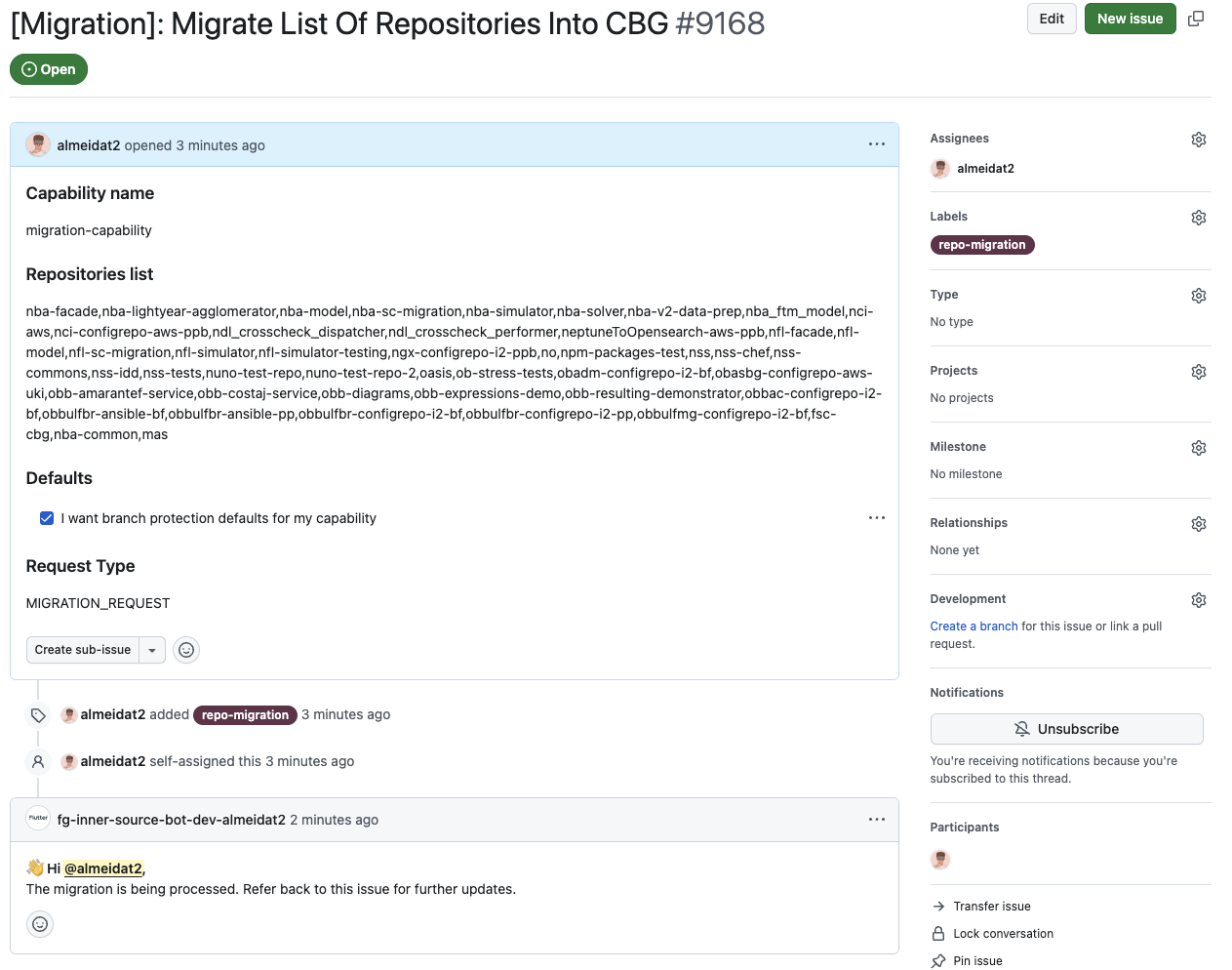
After the issue is created, an automation will start processing the migration. Updates will be sent to the issue as the automation runs, keeping the issue open until it is closed automatically:
- If there are any errors in the input fields, a comment will explain the errors and the issue will be automatically closed. You will need to open a new issue with the correct input values.
- If there are no errors, a pull request will be opened for you in
org-configwith all the necessary files for the migration. A link to the pull request will be commented on the issue.- If the capability is new, the inner source team will need to approve the PR. Send us a message on our Slack channel.
- If the capability already exists, a comment will appear in the pull request with a table of necessary approvals.
Watch this video to see the process in action.
Examples
Numerous capability and configuration examples can be viewed in the org-config repository.
- The Codebase Governor capability defaults are an example of a default config which enforces code owner reviews on the default
mainbranch. - The fsc-cbg repository config is an example config which includes branch protection for develop, release and support branches for the multiple teams branching model.
